Security Footage Writeup (THM)
this is a writeup for the Security Footage room on TryHackMe.
summary
Someone broke into our office last night, but they destroyed the hard drives with the security footage. Can you recover the footage?
we then download the task files , which gives pcap file called security-footage-1648933966395.pcap
so we open it in wireshark
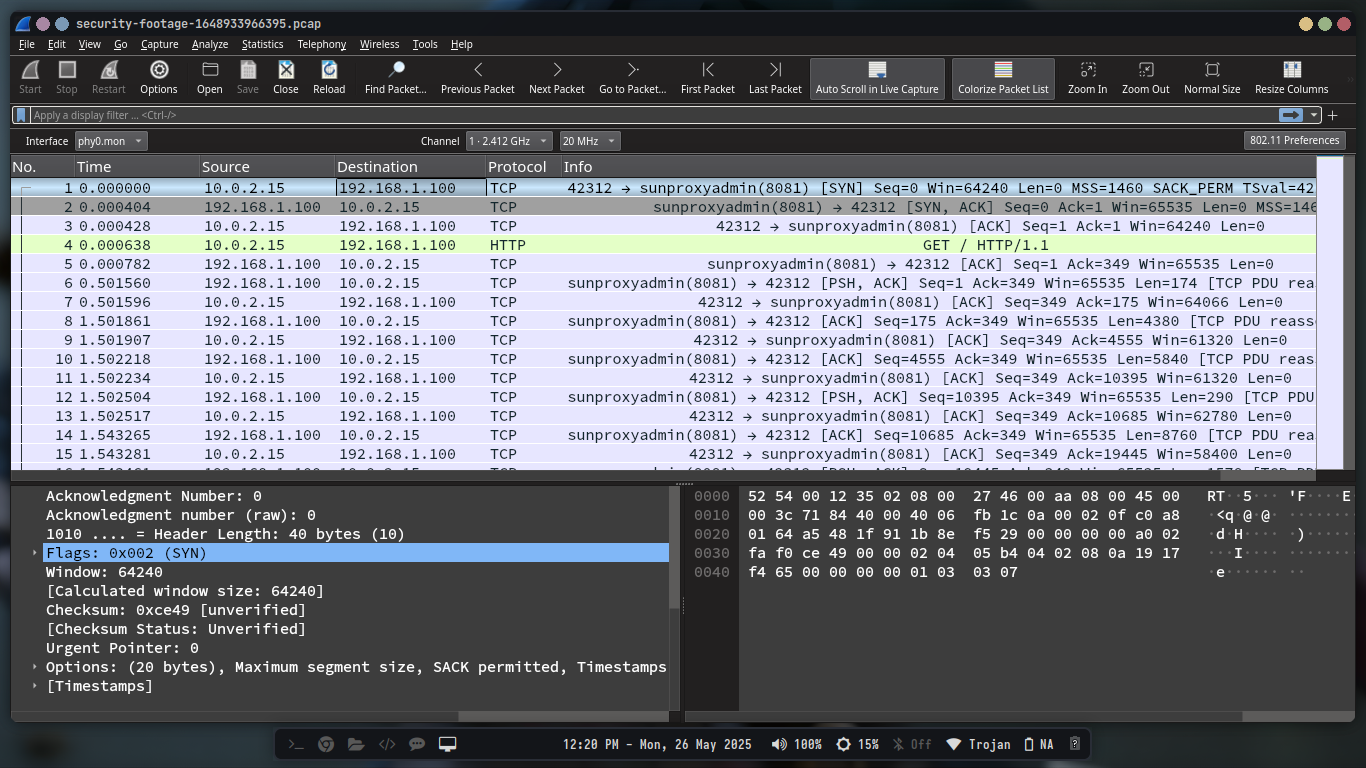
When we look at the first three packets, we can see that the first packet is a TCP SYN packet, the second is a TCP SYN-ACK packet, and the third is a TCP ACK packet. This is the three-way handshake that establishes a TCP connection. After that, we can see that the client sends a HTTP GET request to the server, and the server responds with a HTTP 200 OK response.

We then follow the TCP stream to see the full HTTP request and response.By going to Analyze > Follow > TCP Stream in wireshark, we can see the full HTTP request and response.
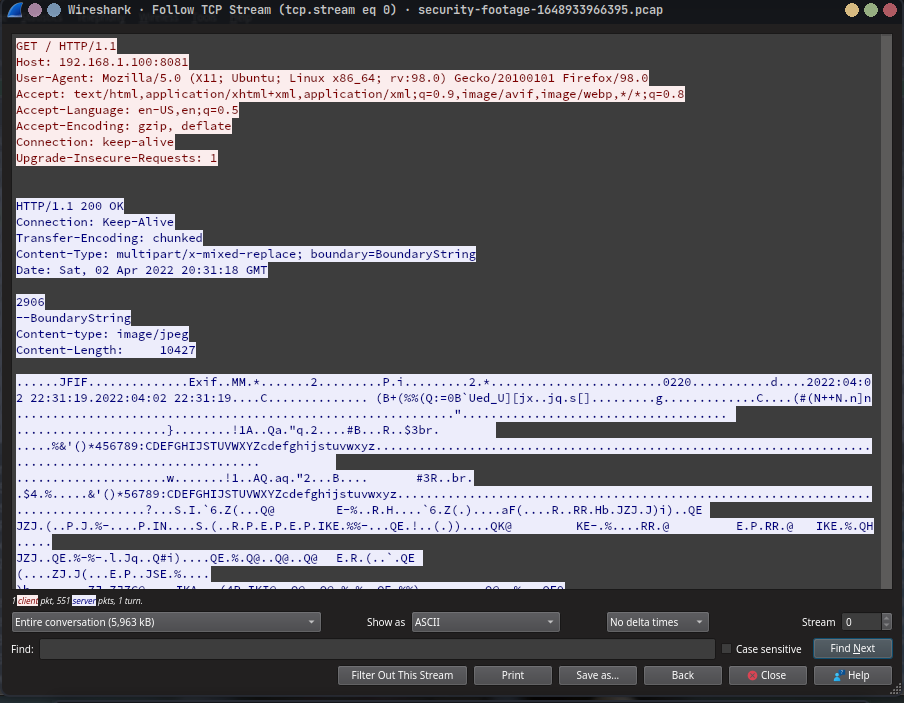
we notice the following in the HTTP request:
1
2
3
4
--BoundaryString
Content-type: image/jpeg
Content-Length:     10427
It is also recurring in the pcap file ,so we have a sequence of images that are being sent over HTTP.
To extract the images, we can use do it manually or use a script to automate the process. In this case, we will use a python script to extract the images.
The script will do the following:
- parse the pcap file,
- find the HTTP packets that contain the images,extract the images from the packets.
- save the images localy.
- then combine the images into a video.
parse the pcap file
We are going to use the scapy library to parse the pcap file. If you don’t have it installed, you can install it using pip:
1
pip install scapy
Here is the code to parse the pcap file
1
2
3
4
5
6
7
8
9
10
11
12
13
14
15
16
17
18
19
20
def process_pcap(pcap_file):
    print("Reading PCAP file...")
    # the rdpcap function reads the PCAP file and returns a list of packets,
    packets = rdpcap(pcap_file)
    # the bytearray is used to collect TCP payload data
    tcp_data = bytearray()

    # the for loop iterates through each packet in the PCAP file,and checks if the packet has a TCP layer and a Raw layer,
    for packet in packets:
        # Check if packet has TCP layer and payload, then extract the TCP payload,
        # this is done to ensure that only packets containing TCP data are processed,
        # this is where the MJPEG stream is expected to be found,
        if packet.haslayer(TCP) and packet.haslayer(Raw):
            # here the bytes of the TCP payload are extracted and appended to the tcp_data bytearray,
            # the packet[Raw].load contains the raw data of the TCP payload,the .extends method appends this data to the tcp_data bytearray,
            tcp_payload = bytes(packet[Raw].load)
            tcp_data.extend(tcp_payload)

    print("Finished reading PCAP. Processing MJPEG stream...")
Then we are going the extract the frames from the buffer and save them as JPEG files. The following code does that:
1
2
3
4
5
6
7
8
9
10
11
12
13
14
15
16
17
18
19
20
21
22
23
24
25
26
27
28
29
30
31
32
33
34
35
36
37
38
39
40
41
42
43
44
45
46
47
48
49
50
51
52
53
54
55
def extract_frames_from_buffer(buffer):
    boundary = b"--BoundaryString"
    frame_count = 0
    offset = 0
    # the while loop iterates through the buffer to find occurrences of the MJPEG boundary string,
    while True:
        offset = buffer.find(boundary, offset)
        if offset == -1:
            break
        # here if the boundary is found, it searches for the next occurrence of the boundary string,and extracts the data between the boundaries,
        # then it looks for the Content-Length header to determine the size of the JPEG frame,
        next_boundary = buffer.find(boundary, offset + len(boundary))
        if next_boundary == -1:
            break

        part = buffer[offset:next_boundary]

        # Find Content-Length by using a regular expression,to match the Content-Length header in the MJPEG stream,
        content_length_match = re.search(
            rb"Content-Length:\s*(\d+)", part, re.IGNORECASE
        )
        if not content_length_match:
            offset = next_boundary
            continue

        content_length = int(content_length_match.group(1))

        # Find end of headers by looking for the double CRLF sequence,to identify the end of the HTTP headers in the MJPEG stream,
        header_end = part.find(b"\r\n\r\n")
        if header_end == -1:
            offset = next_boundary
            continue
        # the jpeg_start is calculated by adding the offset, the length of the boundary, and the length of the headers,
        # and the jpeg_end is calculated by adding the jpeg_start and the content_length,
        jpeg_start = offset + header_end + 4  # the 4 accounts for the \r\n\r\n sequence
        jpeg_end = jpeg_start + content_length

        # we check if the jpeg_end is within the bounds of the buffer,if not, it breaks the loop,
        if jpeg_end > len(buffer):
            break

        jpeg_data = buffer[jpeg_start:jpeg_end]

        # the extracted JPEG data is saved to a file,using the frame_count to create a unique filename for each frame,
        # the frame_count:04d formats the frame number to be four digits long,ensuring consistent naming,
        filename = os.path.join(os.getcwd(), f"frame_{frame_count:04d}.jpg")
        with open(filename, "wb") as f:
            f.write(jpeg_data)
        print(f"Saved frame {frame_count}")
        frame_count += 1

        offset = next_boundary

    print(f"Extraction complete: {frame_count} frames saved."
To create a video from the extracted frames, we can use the ffmpeg.
Here is the code to create a video from the frames:
1
2
3
4
5
6
7
8
9
10
11
12
13
14
15
16
17
18
19
20
21
22
23
24
25
26
27
28
29
30
31
32
33
34
35
36
37
38
39
40
41
42
43
44
45
46
47
48
49
50
51
52
53
54
55
56

def extract_frames_from_buffer(buffer):
    boundary = b"--BoundaryString"
    frame_count = 0
    offset = 0
    # the while loop iterates through the buffer to find occurrences of the MJPEG boundary string,
    while True:
        offset = buffer.find(boundary, offset)
        if offset == -1:
            break
        # here if the boundary is found, it searches for the next occurrence of the boundary string,and extracts the data between the boundaries,
        # then it looks for the Content-Length header to determine the size of the JPEG frame,
        next_boundary = buffer.find(boundary, offset + len(boundary))
        if next_boundary == -1:
            break

        part = buffer[offset:next_boundary]

        # Find Content-Length by using a regular expression,to match the Content-Length header in the MJPEG stream,
        content_length_match = re.search(
            rb"Content-Length:\s*(\d+)", part, re.IGNORECASE
        )
        if not content_length_match:
            offset = next_boundary
            continue

        content_length = int(content_length_match.group(1))

        # Find end of headers by looking for the double CRLF sequence,to identify the end of the HTTP headers in the MJPEG stream,
        header_end = part.find(b"\r\n\r\n")
        if header_end == -1:
            offset = next_boundary
            continue
        # the jpeg_start is calculated by adding the offset, the length of the boundary, and the length of the headers,
        # and the jpeg_end is calculated by adding the jpeg_start and the content_length,
        jpeg_start = offset + header_end + 4  # the 4 accounts for the \r\n\r\n sequence
        jpeg_end = jpeg_start + content_length

        # we check if the jpeg_end is within the bounds of the buffer,if not, it breaks the loop,
        if jpeg_end > len(buffer):
            break

        jpeg_data = buffer[jpeg_start:jpeg_end]

        # the extracted JPEG data is saved to a file,using the frame_count to create a unique filename for each frame,
        # the frame_count:04d formats the frame number to be four digits long,ensuring consistent naming,
        filename = os.path.join(os.getcwd(), f"frame_{frame_count:04d}.jpg")
        with open(filename, "wb") as f:
            f.write(jpeg_data)
        print(f"Saved frame {frame_count}")
        frame_count += 1

        offset = next_boundary

    print(f"Extraction complete: {frame_count} frames saved."
you can find the full code on my github
Open the video file on any media player, and you should see flag.